Consent screen
What the onefold consent screen shows your users, when it appears, and when an application can send users straight through without it.
The consent screen is where a signed-in user approves your application's request. It shows what your application asks for, and the user chooses Authorize or Deny.
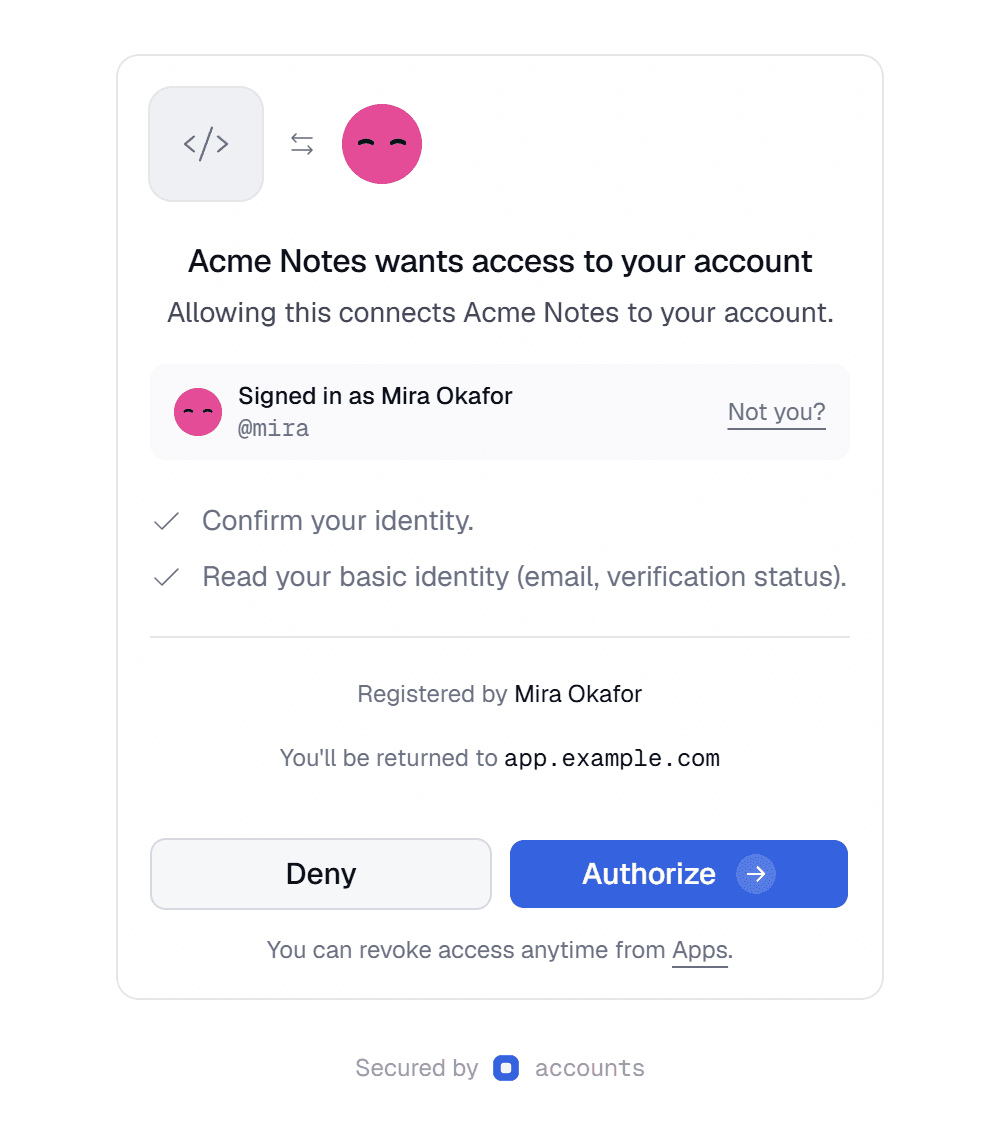 The consent screen for a request with scope=openid identity.
What it shows
- your application's name and logo
- the account the user is signed in with, and a way to switch to another
- one line for each requested scope;
openidandidentityshare one line - for each required social connection, the provider and what it shares, in that provider's own words
- who registered the application
- the host the user will be returned to, taken from the redirect URI
- the Project URL you entered for the application, if any
The user approves or declines the request as a whole.
| The user chooses | Your callback receives |
|---|---|
| Authorize | code, state and iss |
| Deny | error=access_denied, state and iss |
When it appears
By default, on every authorization, including for a user who approved the same scopes before.
No parameter in the authorization request can skip the screen. onefold decides, on each request, from your application's settings.
Skipping the screen
An application can send users from sign-in straight to its callback, with no consent screen. Two things are needed:
- a plan that includes it (
consent_skip_enabled), and - the Send users straight in switch, under The consent screen on the application's OAuth2 tab.
That includes a user's first sign-in to your application and a request for more scopes than they approved before: the authorization approves what it asks for.
With the screen skipped, everything else is unchanged: the grant is recorded, the user sees your application in their authorized applications and can remove it, and the same webhook events are sent.
The screen still shows when the request needs a provider connection (socials:<provider>) whose
provider data has ended, for example after a block is lifted or after the user disconnected
that provider. The screen is where they connect it again, so a request with prompt=none
receives consent_required instead.
If your plan stops including the feature, the consent screen returns on the next sign-in.
After your application moves to another organization, each person sees the screen once, at their next authorization. With the screen skipped, nobody sees it: the authorization approves itself. Their tokens keep working either way.
What you cannot change
- The consent screen always uses the Simple layout, whatever layout your sign-in page uses.
- The onefold mark always shows on the consent screen.
- The wording of each scope line is fixed.
Extra steps after consent
Two things can add a step between the consent screen and your callback:
- a required social connection, when you request a
socials:<provider>scope - sign-up questions placed after consent
Your callback receives the same response either way.
Sign-up questions
Ask your users your own questions during sign-up on the onefold hosted pages, choose where each question appears, and read the answers.
Custom domains
Serve your application's hosted sign-in pages from a domain you own, and what a custom domain changes and does not change in your integration.