Custom domains
Serve your application's hosted sign-in pages from a domain you own, and what a custom domain changes and does not change in your integration.
A custom domain serves your application's hosted sign-in, sign-up and consent pages from a
hostname you own, such as auth.example.com, instead of onefold.eitozx.com. It is part of
every plan.
What changes and what does not
| Changes | Does not change |
|---|---|
| The address in the browser while a user signs in | The issuer. iss stays https://onefold.eitozx.com. |
| The callback URL you register with each social provider | Your OAuth endpoints, discovery document and JWKS |
| Your redirect URIs, and how they are matched | |
| Your client ID and secret |
A custom domain is presentation. Your token verification code needs no change.
Set one up
Open the application's Settings → Domains.
Add the hostname
Under Sign-in domain, enter the hostname you want to use, for example auth.example.com.
Use a subdomain: a bare domain such as example.com cannot hold the CNAME record this needs.
A hostname can belong to one application only.
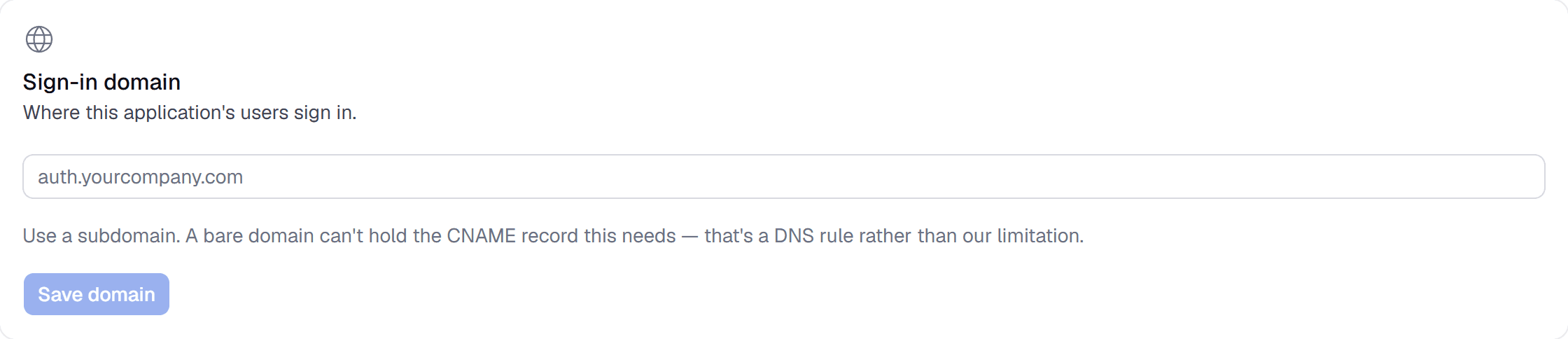 Settings → Domains.
Prove you own it
The portal shows a DNS TXT record. Add it at your DNS provider, then verify in the portal.
Point the hostname at onefold
Add the CNAME record the portal shows. onefold then obtains a certificate for the hostname.
Wait for it to become active
| Status | Meaning |
|---|---|
| Waiting for DNS | The TXT record has not been found yet |
| Waiting for a certificate | Ownership is proven; the certificate is being obtained |
| Active | The hostname serves your sign-in pages |
| Failed | The hostname failed its checks several times in a row and no longer serves. The portal shows the last error. |
| Suspended | Serving is stopped and the configuration is kept, so it can be brought back without setting it up again |
onefold checks the hostname again every day. Keep both DNS records in place: a hostname that keeps failing the check stops serving your sign-in pages.
Things to plan for
- Sign-in sessions are per hostname. A user signed in on
onefold.eitozx.comis not signed in on your custom domain, and the reverse. There is no single sign-on across hostnames, with one exception: the account page, below. - Passkeys are bound to the hostname they were created on. A passkey a user created on
onefold.eitozx.comdoes not work on your custom domain. This is a rule of the passkey standard. - Social providers need the second callback URL. The Socials tab shows a callback URL on your custom domain. Register it with each provider. See Social login.
- Your redirect URIs are unrelated. A custom domain is where onefold's pages are served. A redirect URI is where your application receives the user. Registering a custom domain does not add or relax any redirect URI.
The account page on your domain
Your custom domain also serves the
hosted account page, where a person
manages their profile with your organization, at https://auth.example.com/account/profile.
Change the path on the application's Profiles → Hosted page tab, under Address: one
word of lowercase letters, digits and hyphens, or nothing to put the sections at the domain's
root. Words your domain already serves are refused: o, oauth, accounts, api,
static, admin, docs, internal, maplibre, avatars and well-known.
A person can open the page from their own profile on onefold.eitozx.com. They are not asked
to sign in on your domain: the page shows whose account it is and they continue with one click.
This happens only when your organization's security policy
accepts how they signed in, including a required second factor, a maximum sign-in age, and
whether a sign-in elsewhere counts. Otherwise they sign in on your domain as usual. The
session it starts keeps the time of their original sign-in.
A domain for the developer dashboard
A separate feature serves the developer portal for one application, or for an
organization, from a hostname you own. It is for your developers, not your users, and it
depends on your plan (dashboard_domain_enabled). It is set up in the same place.