Sign-up questions
Ask your users your own questions during sign-up on the onefold hosted pages, choose where each question appears, and read the answers.
Sign-up questions let your application ask its own questions on the hosted pages, such as a company name or a role. onefold renders the questions, and each answer becomes part of the person's organization profile, in a field only your application reads and writes. You read the answers from the developer portal, the management API or the person's profile.
Sign-up questions are a plan feature: custom_signup_fields_enabled turns them on and
max_signup_fields limits how many you can ask. See
Plans and limits.
Where you set them up
Both forms are on the application's Sign-in tab, below Ways in: Sign-up form and After consent.
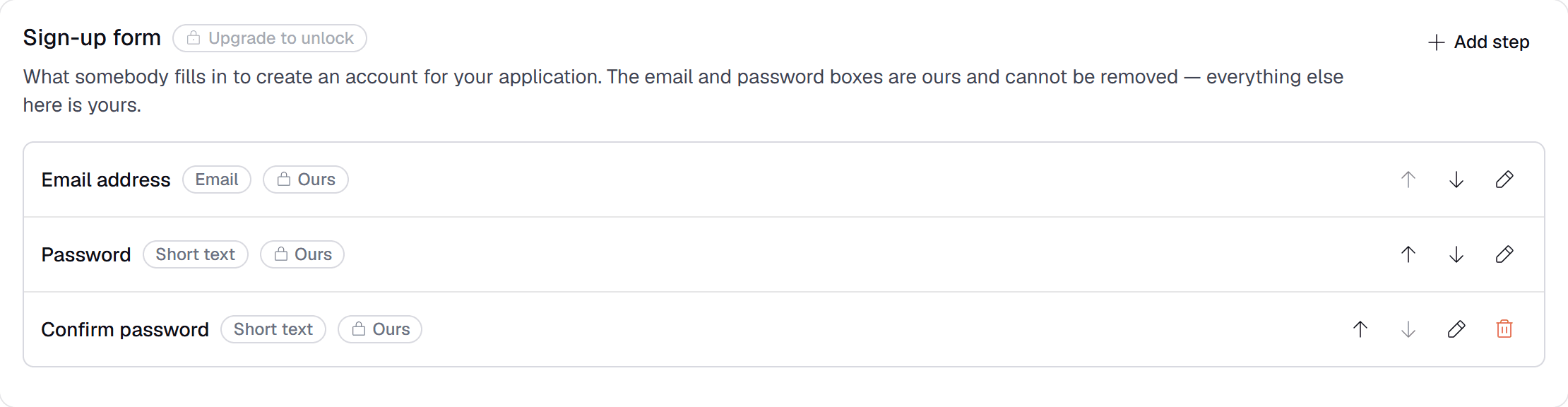 The sign-up form. The fields marked Ours are built in.
Where a question appears
Each question belongs to one of two places.
| Place | When the user sees it | Who sees it |
|---|---|---|
| Sign-up form | While creating an account with an email address and a password on your hosted sign-up page | Only people who create a password account through your application |
| After consent | On a hosted step after the consent screen, before returning to your application | Everyone who authorizes your application, however they signed in |
A person who already has an account, or who arrives through a social provider, never sees your sign-up form. Put a question you need from every user after consent.
Field types
| Type | Renders as |
|---|---|
| Short text | A single-line input |
| Long text | A multi-line input |
| Number | A number input |
| Choice | A list of options you define, up to 25, each up to 60 characters |
| Checkbox | A single checkbox |
| Date | A date input |
A text question can have a maximum length of up to 1,000 characters.
There is no password type and no file upload. You supply labels, placeholders and help text as plain text. You do not supply markup, and you do not design the page.
Required and optional
| Question | What the user can do | Asked again? |
|---|---|---|
| Required | Must answer to continue | Until answered |
| Optional | Can skip | No. A user who skipped is not asked again. |
Adding a new required question later prompts existing users for it the next time they authorize. Adding a new optional question does not prompt users who have already been asked.
Steps
Questions can be split across steps, each with its own heading, so a long form is not one long page. Each place can have up to 10 steps.
On the sign-up form, you can also position the built-in fields among your questions and edit their labels. The email and password fields cannot be removed. The confirm-password field can.
Ask one of your organization's shared fields
A question can also be one of your organization's shared fields, such as a team name every application of the organization uses. Choose it when you add a question. Your application needs write access to that field, the person must be able to see and change it, and the answer becomes the organization's value for the field. Each shared field can be placed once per application.
Keys and types are permanent
Each question has a key, and its answers are stored under that key. Neither the key nor the type can change after the question is created, so choose ones you can keep. A key is unique across your organization's shared fields and every one of its applications' questions.
Removing a question
Removing a question retires it: it leaves your forms and stops being asked, and the answers stay. You can restore a retired question later. To delete a retired question's answers for good, delete them from the retired list in the portal; you confirm it is you first.
Read the answers
| Where | How |
|---|---|
| Developer portal | The application's Users tab, on each user's Profile tab |
| Management API | GET /api/v1/manage/users/{user_id}/profile-fields/, with an API key that has the profile_fields:read scope. The answers are under private_fields, by key. |
Another application cannot read your application's answers, and they are not OpenID Connect
claims: the ID token and /o/userinfo/ never carry them. Your application's key can also
change an answer, with profile_fields:write.
See the management API and Organization profiles.
The hosted step's own endpoint
The API reference lists /api/v1/oauth/signup-fields/ under
Hosted sign-up step. The hosted page calls it during the sign-in flow.
Your server does not call it, and you do not need it to use sign-up questions.
Social login
Let users sign in to your onefold application with Google, GitHub, Discord, GitLab, Microsoft or Facebook, or require a provider connection so your application can read its data.
Consent screen
What the onefold consent screen shows your users, when it appears, and when an application can send users straight through without it.